
Cars these days are largely computers on wheels, for better or worse. The infotainment system is often the deciding factor in whether you actually enjoy living with a vehicle day in and day out.
In a 3-row family SUV like the Mazda CX-90, that screen interface becomes command central for road trips, school runs, and a hub for keeping a full cabin of passengers entertained. While Mazda’s engaging handling and turbocharged 6-cylinder power give it luxury-tier driving dynamics, its approach to interior software remains uniquely opinionated.
Here is everything you need to know about the tech driving the Mazda CX-90.
Display Sizes Depend on Your Trim Level
Unlike its 2-row sibling, the CX-70, which gets the larger display across the board, the CX-90’s screen size depends on where you land in the trim structure. Base Select models start with a 10.25-inch center display, while stepping up to the Preferred trim and above lands you the full-featured 12.3-inch screen setup.
The good news? Wireless Apple CarPlay and Android Auto are standard across the lineup, meaning you don’t have to pay more just to ditch the USB cord.

It’s a Touchscreen… Sometimes
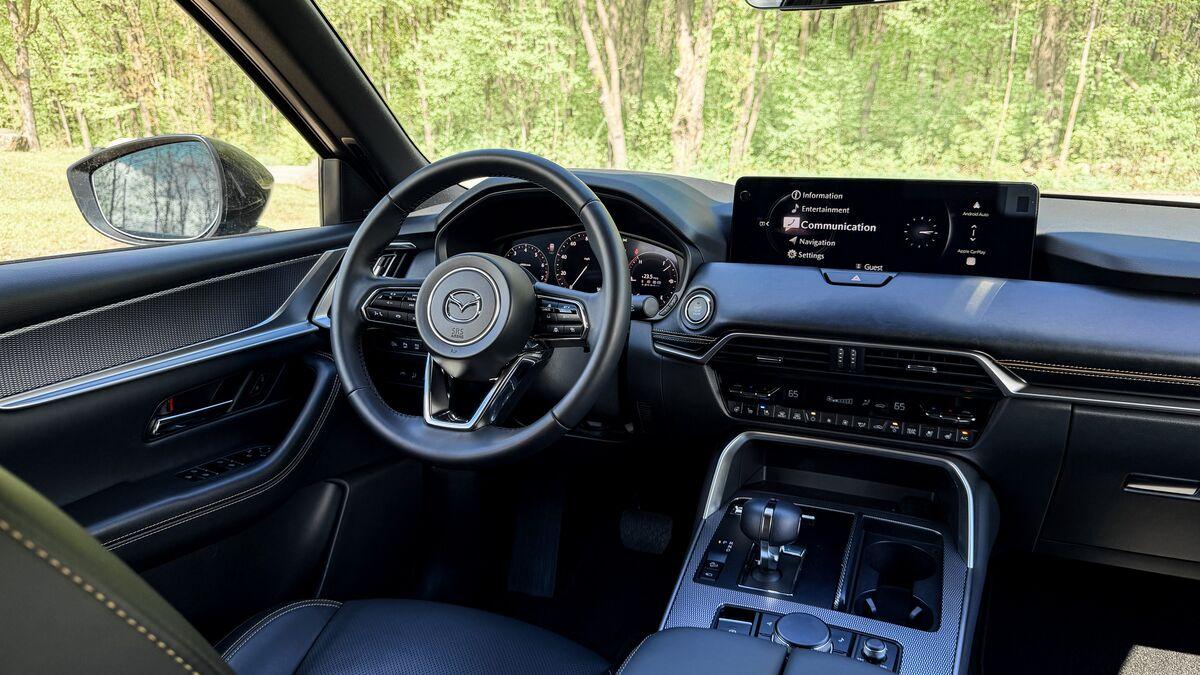
If you’ve driven a modern Mazda, you know the brand’s long-standing philosophy: touchscreen inputs can be a driver distraction, so you primarily navigate menus via a rotary Commander knob on the center console.
However, Mazda compromises with a hybrid approach here. The display operates exclusively via the rotary dial when navigating Mazda’s native menus. Connect your smartphone via Apple CarPlay or Android Auto, though, and touch capability unlocks on the center display. It gives you the tactile control of the dial for native menus while letting you tap and swipe through smartphone apps as expected.
With the Mazda CX-5 entering a new generation, Mazda also introduced a new infotainment system. It uses a large center touchscreen in lieu of any dials, perhaps adjusting their aforementioned long-standing philosophy. We wouldn’t be surprised if the other vehicles in the lineup eventually follow suit, in line with market trends. But, for now, the bigger CX-90 still uses a knob-first approach.
High-Mounted Screen for Visibility
That physical separation between the driver and the dashboard is precise and intentional. Placing the screen so far forward, nearly out of arm’s reach, was only viable because it rarely acts as a traditional touchscreen.
Mazda positions the CX-90’s display high and deeply recessed atop the dashboard to keep key information right in your natural line of sight, drastically reducing the time spent off-angle when checking a turn-by-turn prompt. This was all done in the name of safety. While reaching forward to tap CarPlay targets might feel like a stretch at first, even drivers accustomed to touchscreens often find using the center console knob for smartphone apps to be remarkably quick, precise, and second nature once muscle memory takes over.

Traditional Driver Display Meets Digital Precision
Behind the steering wheel, Mazda’s approach to the gauge cluster mirrors its conservative screen layout. Lower trims use a hybrid layout with a 7-inch digital screen flanked by analog gauges, while upper trims upgrade to a fully digital 12.3-inch instrument cluster.
Mazda intentionally keeps the digital cluster clean, legible, and focused purely on driving telemetry, displaying your speedometer, safety system alerts, and adaptive cruise status. It gets the job done with zero clutter, true to Mazda’s traditional, minimalist digital styling approach. However, some tech-forward buyers may find the lack of deep display customization or virtual cockpit maps a missed opportunity for a flagship SUV. Higher trims round out the driver view with an available Active Driving Display (head-up display) projected onto the windshield, keeping speed and safety cues directly in your line of sight.
Alexa Built-in Meets Smartphone Assistants
To help reduce the need to reach for either the rotary dial or the screen altogether, Amazon Alexa is integrated directly into the CX-90’s native infotainment suite. Without pressing a button, driver and passenger voice commands can adjust dual- or tri-zone cabin temperatures, change media tracks, set navigation destinations, or interact with paired smart home devices while on the road.
Prefer your phone’s default assistant? When running wireless Apple CarPlay or Android Auto, your Siri or Google Assistant companions remain fully accessible via standard steering wheel triggers or wake words like “Hey, Google.”
The Upgrade Path to Bose Audio
Base models come equipped with an 8-speaker audio configuration tuned to Mazda’s natural cabin acoustics. Stepping up to mid- and upper trims rewards you with a 12-speaker Bose Centerpoint surround-sound system that delivers a competitive audio experience in the midsize SUV segment.
Beyond sheer speaker count, the system leverages Bose AudioPilot noise-compensation technology, which actively monitors background cabin noise and dynamically adjusts frequency levels, as well as customizable surround-sound parameters you can fine-tune to your preferred soundstage.
It may be worth noting that Mazda skips features like a driver-to-rear cabin intercom system found in some key 3-row competitors.
Smartphone Remote Access via MyMazda
Every CX-90 connects to the MyMazda mobile app or Apple Watch app via Mazda Connected Services. This enables remote engine start, climate pre-conditioning, door locking/unlocking, vehicle health telemetry reports, and a car finder function. Plug-in hybrid electric vehicle (PHEV) models benefit from the ability to locate charging stations. The ability to use MyMazda via mobile app is free for one year, then $10 per month once the trial expires.
Another software trial worth noting is 3 months of SiriusXM satellite radio, which requires a paid subscription thereafter.