

When it comes to our cars, we live in a world of needs and wants. A head-up display (HUD) may not be essential, but it can quickly become a favorite feature once you experience it.
What Is a Head-Up Display?
A head-up display projects information onto the windshield or a transparent panel in the driver’s line of sight. It commonly shows vehicle speed, the speed limit, navigation directions, and safety alerts.
Because the information appears in the driver’s forward view, a HUD can reduce the need to glance down at the instrument panel.
Head-Up Display Benefits and Risks
HUDs can reduce distraction by limiting the time drivers spend looking away from the road. They may help drivers maintain situational awareness. However, too much information can become distracting. Drivers should configure the display to show only what they find useful.
Types of Head-Up Displays
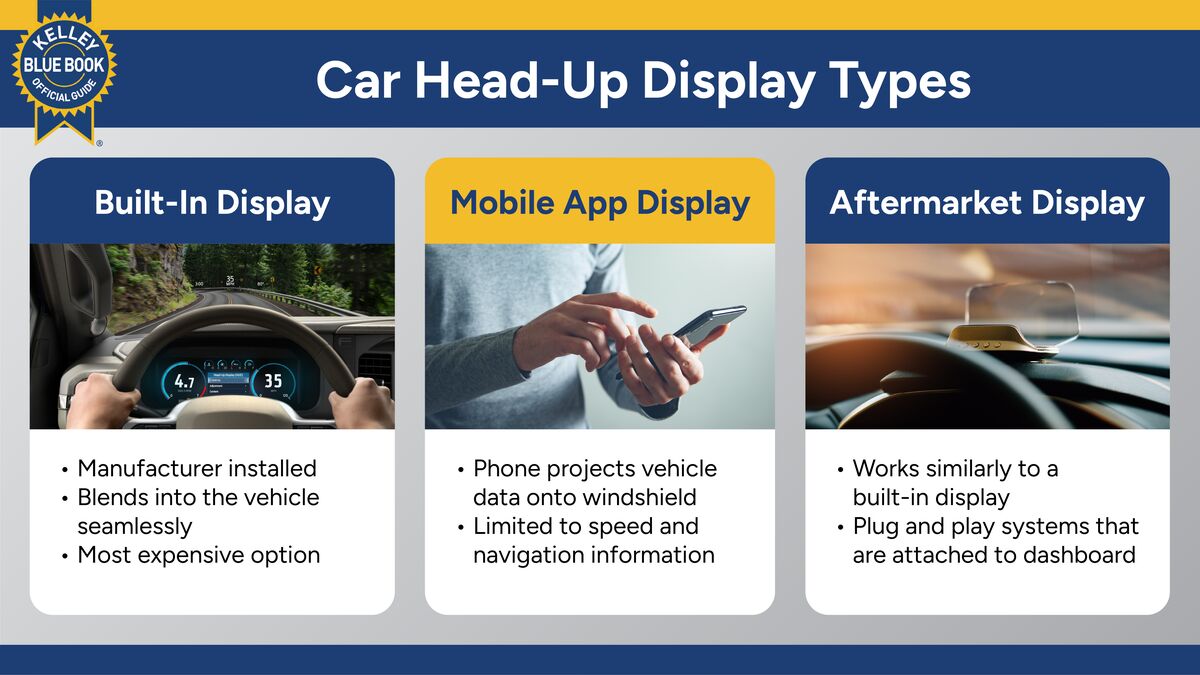
Drivers can choose among factory-installed systems, smartphone apps, and aftermarket displays.
In-Car Head-Up Display
A projector built into the dashboard displays information on the windshield or a transparent panel above the dashboard. These systems usually provide the cleanest appearance and best integration with the vehicle.
Pros
- Blends into the vehicle’s interior
- Included in financing deals and the price of a new car
- May display navigation and safety alerts
- Covered by the new car warranty
Cons
- Often limited to higher trims or option packages
- Drivers can’t move HUDs between cars
Head-Up Display Apps
Some smartphone apps reflect basic information from the phone’s screen onto the windshield. They may display speed and navigation directions. The phone must be secured on the dashboard, and the reflected image may be difficult to see in bright daylight.
Pros
- Many free options
- Little or no additional equipment needed
Cons
- Limited features
- Phone must be secured
- Visibility may be poor in daylight
Aftermarket Head-Up Display
Aftermarket HUDs attach to the dashboard and project information onto the windshield or a separate screen. Many plug into the vehicle’s diagnostic port or a power outlet.
Depending on the model, they may display speed, engine RPM, battery voltage, navigation information, and other vehicle data.
Pros
- Available with a wide range of features
- Can be added to many vehicles
- Some can be moved between cars
Cons
- May clutter the dashboard
- Quality and accuracy vary
- Advanced models can be expensive
What to Look for in a Head-Up Display
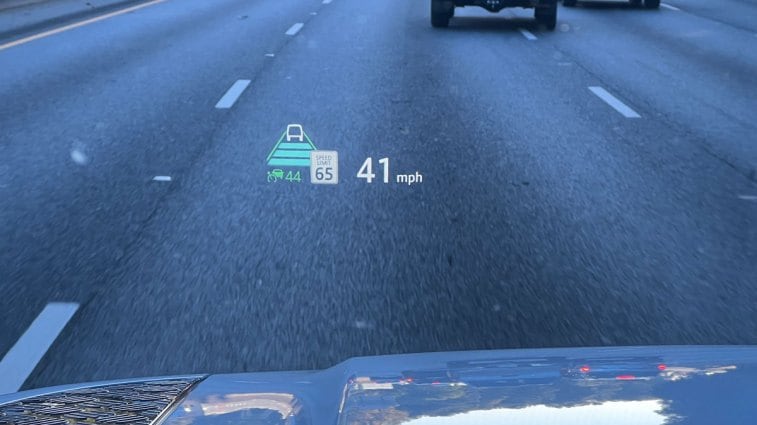
There are several factors to consider if you are actively hunting for a HUD, whether built-in, an app, or aftermarket.
1. Price
Factory-installed systems provide the best integration but may require a higher trim level or option package. Smartphone apps cost little or nothing, while aftermarket systems provide a middle ground.
2. Display Size
A larger display can show more information, but bigger is not always better. A small display may be sufficient if you only want to see your speed.
3. Visibility
The display should remain easy to read in bright sunlight, darkness, and changing light. Look for adjustable brightness controls and test the unit’s visibility while wearing sunglasses.
4. Features
Choose a system that displays the information you use most. Depending on the vehicle or device, available information may include:
- Vehicle speed
- Speed limit
- Navigation directions
- Infotainment information
- Battery charge
- Safety alerts
- Vehicle warnings
Factory systems usually offer the broadest integration. Smartphone apps display less information, while aftermarket systems vary widely.
Head-Up Display History
HUDs date to the early 1960s, when they were used in U.S. military aircraft. The technology reached production cars in 1988, when General Motors offered a HUD in the Oldsmobile Cutlass Supreme. Today, many automakers offer the feature.
Visit our Car Features Information Center to learn more about the bells and whistles in today’s vehicles.
Editor’s Note: We have updated this article since its initial publication. Russ Heaps contributed to the report.